In digital business, first impressions are measured in milliseconds. When a prospective client clicks your link, they form an immediate judgment about your brand's credibility. If a page stalls or takes seconds to render, visitors leave. For modern businesses, website speed optimization is no longer just a technical checkbox—it is a foundational pillar of user experience, conversion rate optimization, and search discoverability.
Google recognizes this user reality, factoring page experience and how website speed affects business growth into its Core Web Vitals framework. Yet many websites struggle with bloated scripts and heavy media. At Digitons Development, we believe an agency providing web development services and running comprehensive technical SEO audit programs must hold its own properties to the highest standards. Here is a transparent breakdown of our website performance based on our official Google PageSpeed Insights report.
Why We Tested the Digitons Development Website
Engineering teams often prioritize client deliverables while allowing their own website to accumulate technical debt. Over time, marketing scripts, media files, and design iterations can quietly degrade page responsiveness. To ensure our engineering practices deliver real-world excellence, we audited the Digitons Development desktop website on 27 October 2026 using Google PageSpeed Insights.
Our objective was twofold: establish an objective benchmark across performance, accessibility, best practices, and SEO, and identify latent optimization opportunities. Rather than presenting hypothetical advice, this website optimization case study examines our actual desktop Lighthouse report data and highlights practical techniques that any business can apply to improve website loading speed.
Our PageSpeed Insights Results: The Actual 27 October 2026 Audit
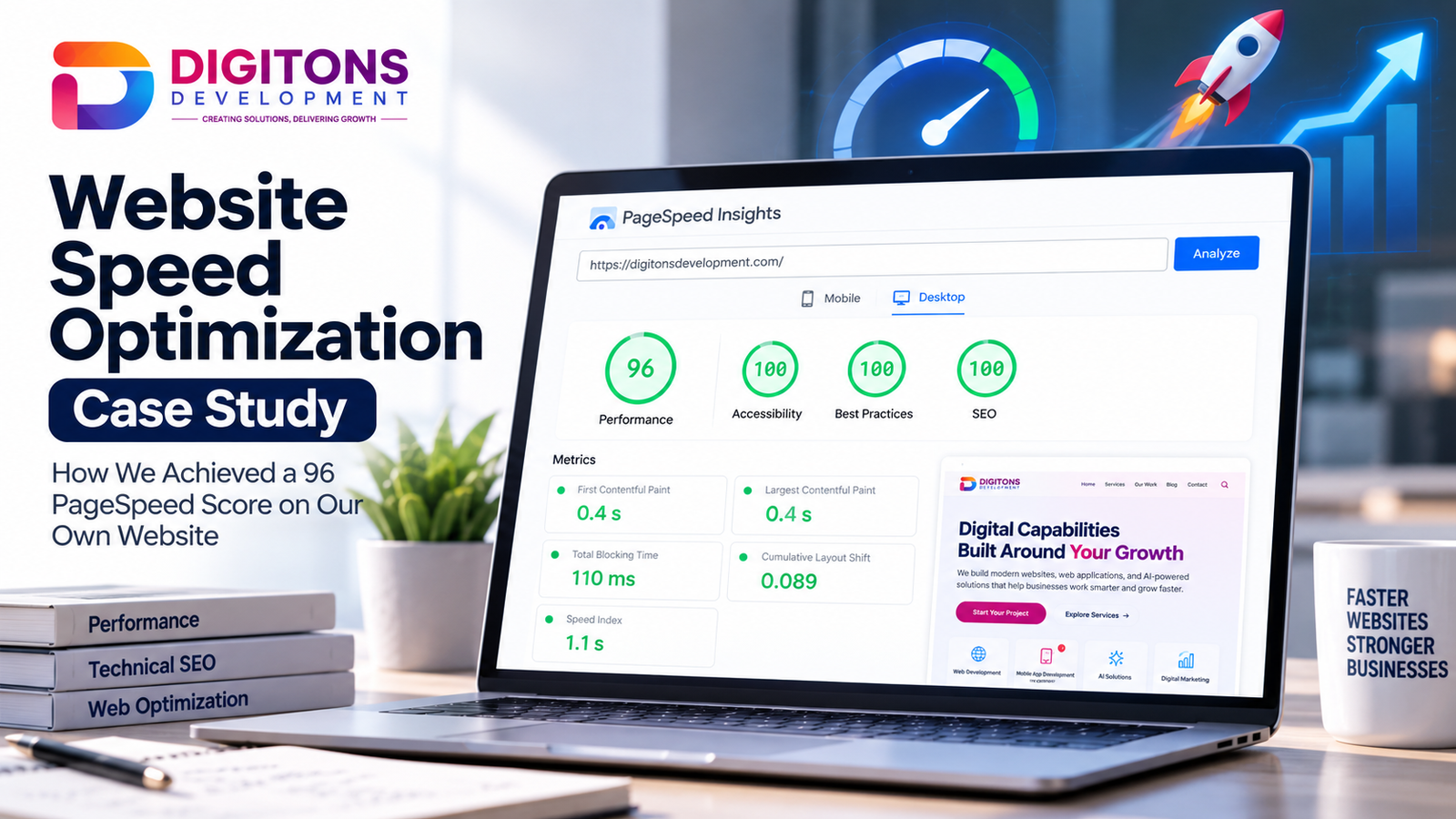
The desktop audit completed on 27 October 2026 demonstrated exceptional performance across all four core Lighthouse audit categories, earning perfect 100s in three categories paired with a 96 overall performance score.
| Metric / Category | Reported Result | Benchmark Rating |
|---|---|---|
| Performance Score | 96 / 100 | Elite (≥ 90) |
| Accessibility Score | 100 / 100 | Optimal Compliance |
| Best Practices Score | 100 / 100 | Modern Web Standards |
| SEO Score | 100 / 100 | Full Technical Crawlability |
| First Contentful Paint (FCP) | 0.4 seconds | Fast (≤ 1.8s) |
| Largest Contentful Paint (LCP) | 0.4 seconds | Fast (≤ 2.5s) |
| Total Blocking Time (TBT) | 110 ms | Good (≤ 200ms) |
| Cumulative Layout Shift (CLS) | 0.089 | Good (≤ 0.100) |
Both First Contentful Paint (FCP) and Largest Contentful Paint (LCP) registered at 0.4 seconds on the tested desktop run, meaning visitors see critical header and page content almost instantaneously. Total Blocking Time (TBT) measured 110 ms, confirming that the main browser thread remains receptive to user interactions without script stalls. Cumulative Layout Shift (CLS) came in at 0.089, safely below Google's 0.100 threshold, preventing visual jumps during asset loading.
Understanding Lab Data vs. Real-User Field Data
A crucial distinction in website performance optimization is the difference between synthetic lab tests and real-user field telemetry. The metrics above represent lab data generated under controlled Lighthouse simulation conditions. Lab audits are ideal for diagnosing bottlenecks and testing code changes in a standardized environment.
However, lab tests do not capture real-world user diversity. Real visitors access websites across diverse hardware, browsers, and network connections. Field data (such as Chrome User Experience Report data monitored via web analytics) aggregates experiences from real users over 28 days. A 96 desktop lab score confirms that the technical foundation is lean, but ongoing monitoring of field metrics is essential to ensure consistent real-world speed.
What the Audit Revealed About Images, JavaScript, CSS, and Layout Rendering
A high score does not mean optimization is finished. A thorough technical SEO audit using Google PageSpeed Insights surfaces concrete diagnostic opportunities. Even with a 96 performance rating, the report flagged several areas where transfer size and rendering execution can be improved:
- Image Delivery (Estimated 534 KiB Savings): The audit identified approximately 534 KiB in potential transfer savings through next-gen formatting and responsive sizing. Serving tailored dimensions and modern formats like WebP or AVIF ensures users download only the exact pixels their display requires.
- Unused JavaScript (Estimated 75 KiB Savings): Lighthouse flagged approximately 75 KiB of unused script code. Trimming unneeded module imports, deferring non-critical scripts, and loading interactive widgets on demand reduces main-thread parsing overhead.
- Unused CSS (Estimated 21 KiB Savings): The report surfaced roughly 21 KiB of unused stylesheet rules. Pruning unused utility classes and inlining critical path styles reduces render-blocking delays during the initial page paint.
- Rendering & Layout Observations: Diagnostic findings highlighted layout reflows, overall DOM size, and animation rendering. Ensuring animations use GPU-accelerated CSS properties (like
transformandopacity) rather than layout-triggering properties keeps frame rates fluid.
Practical Website Speed Optimization Techniques
Sustainable website speed comes from disciplined engineering habits across four essential areas:
1. Modern Image Delivery & Explicit Dimensions
Images often account for the bulk of page weight. Serve imagery in WebP or AVIF formats to reduce file sizes by 30% to 50% without quality loss. Always declare explicit width and height attributes or CSS aspect ratios on image tags to reserve screen space and eliminate layout shifts (CLS). Use fetchpriority="high" on primary hero images, while applying loading="lazy" to below-the-fold assets.
2. JavaScript Restraint & Main-Thread Protection
JavaScript is computationally expensive because browsers must download, parse, and execute it. Add the defer attribute to non-essential scripts, audit third-party tracking tags, and load analytics asynchronously so they do not inflate Total Blocking Time.
3. Streamlined CSS & Critical Path Rendering
Because CSS blocks page rendering, keep stylesheets lightweight. Remove dead classes, avoid @import inside stylesheets, and minify production CSS files so the browser paints readable content immediately.
4. Server-Side Compression & Browser Caching
Configure modern compression (Brotli or Gzip) for all text resources. Pair this with explicit HTTP cache headers for versioned static assets, and use HTTP/2 or HTTP/3 multiplexing to serve requests concurrently.
How to Test Performance and Verify Improvements
Regular performance profiling helps track speed and catch regressions early. We recommend utilizing this toolset:
- Google PageSpeed Insights: For combined desktop and mobile synthetic audits paired with real-world CrUX data.
- Chrome DevTools: For profiling main-thread execution, identifying long tasks, and debugging forced layout reflows. Pair this with our on-page SEO audit guide for structural checks.
- WebPageTest: For multi-location testing with custom connection profiles and filmstrip rendering views.
- Google Search Console (Core Web Vitals): To track real-user URL health across your domain.
Lessons Businesses Can Apply to Their Own Websites
The findings from this website optimization case study offer three practical takeaways:
- Speed Protects Revenue: Faster pages deliver lower bounce rates, higher user engagement, and improved conversion rates.
- Aesthetics Do Not Require Bloat: Achieving a 96 score does not require stripping away modern typography, custom branding, or interactive elements. Clean engineering allows rich design and fast performance to coexist.
- Performance Is an Ongoing Habit: Speed is not a one-time project. Regular audits prevent new marketing tools and unoptimized uploads from silently eroding your competitive edge.
Frequently Asked Questions
What is considered a good Google PageSpeed Insights score?
Google considers 90–100 "Good" (green), 50–89 "Needs Improvement" (orange), and 0–49 "Poor" (red). While 90+ confirms technical efficiency, businesses should focus on Core Web Vitals thresholds (LCP ≤ 2.5s, TBT ≤ 200ms, CLS ≤ 0.1s) for real visitors rather than chasing 100 on every synthetic test.
How does website speed optimization affect Core Web Vitals and SEO rankings?
Google includes Core Web Vitals in its page experience ranking evaluation. Fast, visually stable websites gain a ranking advantage over slow competitors. Furthermore, rapid loading speeds enable search engine spiders to crawl more pages efficiently within your site's crawl budget.
What is the difference between lab data and field data in PageSpeed Insights?
Lab data is collected in a controlled environment with fixed hardware and network profiles, making it ideal for debugging. Field data reflects real-world user metrics from the Chrome User Experience Report across diverse devices and live connection conditions over a 28-day window.
Can a website score 90+ without sacrificing modern design quality?
Yes. Achieving high performance does not require plain-text pages. By adopting modern image formats, reserving layout dimensions, deferring non-critical scripts, and using GPU-accelerated CSS transitions, websites can deliver rich brand aesthetics while maintaining elite speed.
How often should a business perform a technical speed audit?
Businesses should run performance checks before major deployments and conduct a thorough technical audit quarterly to catch script bloat and maintain established performance budgets.
Want to Improve Your Website Speed?
A faster, more reliable website can provide a better experience for your visitors. Digitons Development can help you assess website performance and identify practical optimization opportunities.
Ready to turn these ideas into results?
Let's discuss how tailored digital marketing, custom web engineering, and targeted SEO can accelerate your business goals.