From an engineering perspective, your website appears completely healthy. The pages load quickly, the server uptime sits at 99.9%, the contact forms submit without throwing JavaScript errors, and Google Analytics logs steady monthly conversion events. Yet, during executive sales reviews, revenue targets are missed. Your sales leadership insists that lead quality is abysmal or that volume has dried up, while your marketing team points to verified analytics dashboards proving that enquiries are flowing in as planned.
When web metrics indicate success but sales pipelines remain stagnant, the failure rarely stems from front-end design. The true breakdown occurs in the digital pipeline between the moment a prospect clicks "Submit" and the moment an internal sales representative initiates contact. This is the operational reality of website lead management problems.
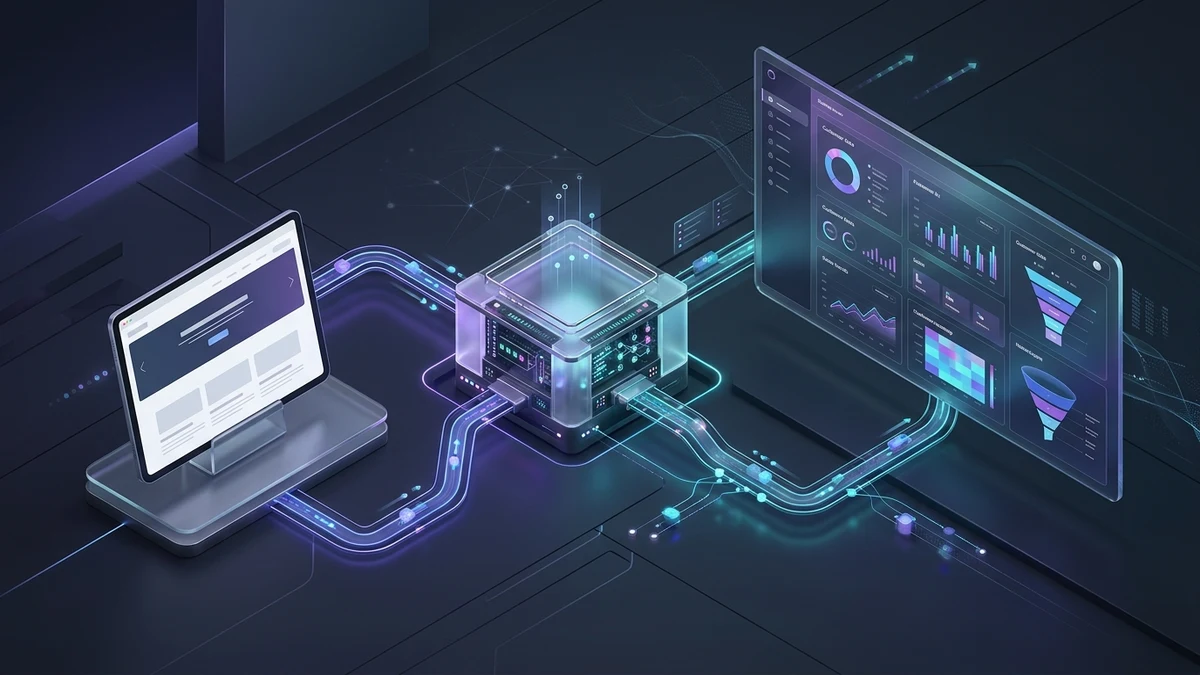
A website does not end at the visual interface; it is the front gateway of your business's sales infrastructure. When website technology is disconnected from backend workflows, CRM databases, routing logic, and operational response protocols, valuable inquiries vanish into digital voids. Fixing this disconnect requires diagnosing the entire lifecycle of an enquiry and engineering a resilient bridge between web visitors and your revenue team.
The End-to-End Website-to-Sales Journey Framework
To understand why opportunities are lost, businesses must map the entire path an enquiry takes through their technology stack. An effective lead capture and management framework consists of seven interconnected stages:
- Visitor Interaction: The prospective client evaluates your service pages, proof points, and value proposition.
- Form / CTA Engagement: The visitor interacts with structured form fields designed to collect necessary qualification parameters without introducing cognitive friction.
- Submission & Server-Side Validation: The server verifies input integrity, mitigates spam via automated challenges, and commits the record securely to a primary database.
- Operational Dispatch & Notification: Transactional emails, instant alerts, and backup webhooks trigger simultaneously to notify designated personnel.
- CRM Ingestion & Lead Assignment: The record is automatically synchronized with customer relationship management software, tagged with attribution parameters, and routed to an assigned account executive based on business logic.
- Customer Acknowledgement & Follow-Up: The prospect receives instant confirmation outlining clear next steps, followed by personalized human engagement within established operational response windows.
- Closed-Loop Attribution & Measurement: Sales outcomes, lead disqualifications, and deal values feed back into web analytics to evaluate true commercial channel performance.
A failure at any single point in this sequence breaks the entire chain. Even if stages 1 through 3 function flawlessly, a breakdown in stages 4 or 5 ensures the commercial opportunity is squandered.
7 Critical Website Process Gaps That Leak Revenue
By auditing the transition points between web architecture and internal operations, businesses can identify and resolve the operational vulnerabilities that cost them valuable clients.
1. Form Architecture Mismatches (Asking for Too Little or Too Much)
Form design is a delicate operational balance. If a contact form demands twenty mandatory fields—requesting company size, fiscal budgets, industry sector, implementation timelines, and physical mailing addresses—qualified prospects abandon the form due to excessive friction. Conversely, reducing a form to only a name and email address creates internal chaos. Without knowing project scope, service interest, or urgency, sales teams cannot prioritize outreach, leaving high-value enterprise inquiries buried beneath generic messages.
2. The Unmonitored Shared Inbox Black Hole
A surprising number of mid-sized organizations still rely on a single generic email address (such as info@yourcompany.com or contact@yourcompany.com) as their primary lead capture destination. When form submissions arrive in a shared inbox accessible by five different employees, accountability evaporates. Team members assume someone else is handling the enquiry, messages get marked as read accidentally, or incoming leads get buried beneath vendor spam, newsletters, and internal memos.
3. The Zero-Acknowledgement Experience
When a decision-maker submits an enquiry regarding a substantial commercial project, their immediate post-submission experience sets the tone for the entire business relationship. Redirecting the user to a generic blank page with a two-word confirmation message ("Message sent") provides zero confidence that their submission was received. In the absence of an immediate automated confirmation email detailing who will respond and within what timeframe, high-intent prospects immediately open a new tab and submit an enquiry to your primary competitor.
4. Disconnected Infrastructure and Manual Copy-Pasting
Relying on manual human intervention to transfer lead details from web email notifications into a CRM system or sales pipeline tracker guarantees operational failure. Human error inevitably leads to typos in phone numbers, misread email addresses, and delayed entries. During weekends or holiday periods, inquiries sit unattended in inboxes for days before being manually entered into sales software, completely missing the window of peak buyer interest.
5. Broken Marketing Attribution and Source Blindness
When a lead record enters your sales CRM without digital tracking context, your sales team operates blind. They do not know whether the prospect arrived through an organic search for enterprise solutions, a highly specific paid campaign, or a referral link. Furthermore, your marketing team cannot determine which campaigns generate revenue versus those that generate low-grade inquiries, resulting in misallocated marketing budgets.
6. Mobile Form Friction and Responsive Failures
More than half of initial business evaluations occur on mobile devices, yet contact forms are frequently tested exclusively on desktop monitors. Clumsy mobile dropdowns, unoptimized touch targets, aggressive auto-correct on technical fields, and submit buttons positioned off-screen create silent drop-offs. If a form fails to trigger the appropriate mobile numeric keypad for telephone fields, user abandonment rates escalate rapidly.
7. Complete Disconnection Between Sales Outcomes and Web Analytics
Most organizations celebrate raw form submissions as the ultimate conversion goal in their web analytics dashboards. However, if 80% of those submissions turn out to be spam, recruitment inquiries, or unqualified leads, marketing continues optimizing campaigns toward low-value traffic. Without closed-loop tracking that connects qualified sales pipeline back to web analytics, digital strategies remain fundamentally misaligned with revenue goals.
Comparison: Fragile Lead Flow vs. Resilient Lead Architecture
| Workflow Component | Fragile Lead Flow (High Revenue Risk) | Resilient Lead Architecture (Integrated) |
|---|---|---|
| Database Capture | Form relies solely on basic PHP mail(); if mail server fails, lead is permanently lost | Form commits lead to local database first, then dispatches notifications via redundant queues |
| CRM Integration | Manual data entry by office staff hours or days later | Instant real-time webhook ingestion into CRM with duplicate detection |
| Internal Notification | Sent to a shared, unassigned company inbox without tracking | Direct assignment to specific sales representative with automated SLA timers |
| Prospect Experience | Basic text alert on page; no follow-up documentation provided | Dedicated confirmation landing page + instant branded transactional confirmation |
| Lead Attribution | Source unknown; logged as "Website Lead" | UTM parameters, landing page path, and referral source appended to CRM record |
| Spam Mitigation | Annoying distorted image captchas that frustrate human buyers | Modern, frictionless invisible challenges (e.g., Cloudflare Turnstile) + honeypots |
Common Mistakes When Attempting to Fix Lead Workflows
When organizations recognize that leads are slipping through their fingers, well-meaning teams often introduce remedies that inadvertently worsen the problem. Avoid these typical pitfalls:
- Blaming Frontline Sales Without Auditing Infrastructure: Before reprimanding sales representatives for poor closing rates, verify whether notifications actually reached them promptly. Audits frequently reveal that notification emails were caught in spam filters or delayed by mail server greylisting.
- Adding Bloated Form Steps as a Band-Aid: Attempting to eliminate spam by adding complex multi-step questionnaires often penalizes legitimate high-value prospects. Spam mitigation should be handled technically via honeypot fields and server-side verification, not by exhausting your prospect.
- Neglecting Database Backup Fallbacks: If your website relies entirely on third-party webhook endpoints (such as Zapier or external CRM APIs) without writing the submission to a secure local database first, a temporary API outage at the third party results in permanently destroyed leads.
- Ignoring Response Time Service Level Agreements (SLAs): Technology alone cannot close deals. Research consistently demonstrates that the likelihood of qualifying a commercial prospect plummets dramatically if outreach is delayed past the first few hours. Automating technology without establishing strict internal response protocols produces minimal ROI.
Actionable Blueprint: Building an Unbreakable Lead Pipeline
Transforming your website from a passive brochure into an integrated business acquisition engine requires deliberate engineering and workflow discipline. Follow this technical and operational blueprint:
Phase 1: Secure the Server-Side Ingestion Layer
Ensure that your website forms execute parameterized SQL queries to record every valid submission to a private, secure database table before any email or API action is attempted. Implement transactional SMTP via authenticated services (e.g., Amazon SES, Postmark, or dedicated host SMTP) rather than unauthenticated server mail functions to prevent email deliverability failures.
Phase 2: Implement Redundant Notification Webhooks
Configure automated webhooks that duplicate lead records directly into your CRM or internal management sheet simultaneously. If your CRM experiences downtime, your database records and transactional emails preserve the data. Ensure every payload carries technical metadata: timestamp, IP address, user agent, requested service, and campaign attribution.
Phase 3: Design Frictionless Qualification Forms
Audit every field on your forms. Ask only for information necessary to route and qualify the opportunity: Name, Business Email, Phone Number, Service of Interest, and a Project Overview field. Replace generic dropdowns with structured options that match your business units, making it effortless for the user to categorize their requirements.
Phase 4: Elevate the Post-Submission Experience
Replace generic alert banners with a dedicated confirmation experience. Confirm receipt unambiguously, introduce the team members who handle onboarding, provide links to relevant case studies or whitepapers to read while they wait, and offer an immediate optional link to continue the conversation via direct consultation channels such as WhatsApp or an executive calendar link.
Phase 5: Connect Analytics to Bottom-Line Pipeline
Implement comprehensive dataLayer events that trigger only upon verified database insertion. Connect this data with Google Analytics 4 to track micro-conversions and service choices. Integrate your CRM deal stages back into your reporting dashboards to measure which traffic channels yield profitable client relationships rather than empty clicks.
Frequently Asked Questions (FAQ)
Why are our website contact form emails going straight to the spam folder?
This almost always occurs because the website is using the default server PHP mail() function, which lacks proper domain authentication. Without valid SPF (Sender Policy Framework), DKIM (DomainKeys Identified Mail), and DMARC DNS records matching the sending mail server, modern corporate email firewalls flag automated form notifications as suspicious or spoofed emails. Routing form emails through an authenticated SMTP service with proper DNS records resolves this immediately.
How many fields should an effective B2B contact form have?
For most commercial service organizations, four to six fields represent the optimal balance between high conversion and meaningful qualification. These typically include Full Name, Work Email, Phone Number, Primary Service Needed (via dropdown), Estimated Budget or Timeline (optional), and Project Details. Requiring physical addresses or extensive demographic data unnecessarily suppresses conversion rates.
What is a honeypot field, and how does it stop form spam without bothering users?
A honeypot is a hidden form field that is invisible to human visitors using standard browsers (hidden via CSS) but visible to automated spam bots that parse raw HTML code. When a spam bot automatically fills out all fields, including the invisible honeypot, the server detects input in that field and silently discards or flags the submission without interrupting legitimate human prospects with annoying image puzzles.
Should our business use automated instant auto-responders for contact forms?
Yes, absolutely. An immediate automated email reassures the prospect that their message was successfully received and sets expectations regarding when a team member will follow up. To maximize value, include practical resources, direct contact details for urgent queries, and an outline of your company's onboarding process.
What is the difference between a lead capture problem and a lead management problem?
A lead capture problem occurs on the website interface itself—such as broken form scripts, confusing calls to action, or slow loading speeds that prevent visitors from submitting their information. A lead management problem occurs after the form is submitted—such as missed notifications, lack of CRM logging, unassigned leads, and delayed sales follow-up that allow real opportunities to go cold.
Can we integrate our website forms with multiple third-party tools simultaneously?
Yes. A well-engineered backend can record an enquiry to a secure internal database and concurrently trigger separate webhooks to your CRM, an internal team collaboration channel (such as Slack or Microsoft Teams), an authenticated email relay, and an analytics event dispatcher. This multi-threaded architecture ensures operational transparency across departments.
Transform Your Website Into a Resilient Pipeline Engine
Generating web traffic and designing elegant landing pages requires significant investment. Allowing those investments to bleed away due to neglected notification pathways, missing integrations, or disorganized lead routing is an operational failure that no business can afford.
When engineering, analytics, and sales workflows operate in synchronized harmony, every legitimate inquiry is captured, acknowledged, routed, and pursued with professional precision. That is how forward-thinking companies turn digital presence into predictable commercial revenue.
Learn how our engineering team builds high-performance custom web development solutions and integrated web analytics frameworks, or explore our website design services. Ready to audit your digital infrastructure? Speak with Digitons Development today.
Ready to turn these ideas into results?
Let's discuss how tailored digital marketing, custom web engineering, and targeted SEO can accelerate your business goals.